
Accessibility at the Boston Public Library
The Boston Public Library strives to make our resources accessible to all users through a variety of collections, services, and specialized equipment. The following collections, services, and equipment are available for use at the Central Library in Copley Square.
For information about specific spaces, services, equipment, and collections, please use the contact information listed below. If you have general questions or suggestions related to accessibility at the Boston Public Library, please email BPL's Accessibility Committee at ask@bpl.org.
Accessible Entrance, Parking, and Floor Plan
Both entrances to the Central Library in Copley Square are accessible.
- The entrance at 700 Boylston Street is at sidewalk level.
- The entrance at 230 Dartmouth Street is 8 stairs above street level. A series of accessible ramps are located to the left of the entrance.
All public floors and spaces are accessible via elevator and/or wheelchair lift.
To view a floor map of the Central Library (including both the McKim Building and Boylston Street Building), visit Central Library Floor Plan.
There are accessible parking spots in front of the Boylston Street entrance to the library. For more information, visit Parking near the Central Library.
For questions about physical accessibility at the Central Library, contact the Visitor Experience team at visit@bpl.org or 617-859-2216.


Services
Interpretation services are available for library programs. Please contact the staff member, department, or location on the event listing or flyer to request interpretation services in advance of the program. Several of our program spaces are equipped with assistive listening devices. Contact the Events department in advance at 617.859.2212 or events@bpl.org to request the use of this service for specific events or programs.
Interpretation services are available at all BPL locations through Lionbridge. This on-demand remote service provides immediate access to professional interpreters in more than 200 languages, including American Sign Language (ASL), by phone or through video on a computer. Service desks also display a language identification sign to help patrons communicate their preferred language with staff.

Equipment
Magnifying glasses are available at the following public service desks:
- Washington Room (McKim second floor)
- Children's Library (Boylston Street second floor)
- Community Information (Boylston Street second floor)
- Teen Central (Boylston Street second floor)
- New & Novel (Boylston Street first floor)
- Tech Central (Boylston Street first floor)
- Kirstein Business Library & Innovation Center (Boylston Street lower level)
A full page magnifier is available at the Community Information desk on the second floor of the Boylston Street Building. A digital magnifier is available at the Washington Room desk on the second floor of the McKim building.
Large print, high-contrast keyboards are available at many of the public computer stations at Tech Central (Boylston Street first floor) and by request in the Kirstein Business Library & Innovation Center (Boylston Street lower level). Staff at the desk can assist patrons with basic computer questions. If advanced or extended one-on-one assistance is needed, please make an appointment by emailing computerworkshops@bpl.org or calling 617.859.2323.
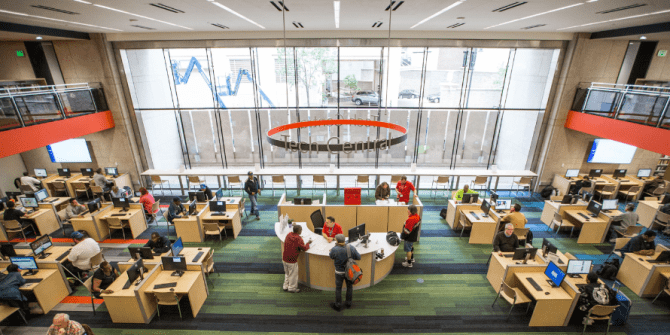
An adaptive computer station is available for use in Tech Central, on the first floor of the Boylston Street Building. The computer is equipped with Windows 11 with Microsoft Office 2024 and Microsoft Edge and Chrome browsers. The station features high-visibility display settings (150% scaling and enlarged cursor) and the following additional tools:
- Jaws Screen Reader
- Windows Ease of Access capabilities
- Duxbury Braille Translator
- Braille Printer Juliet
- Kurzweil 3000
Please call 617.859.2323 or email computerworkshops@bpl.org for more information about the adaptive computer station or the Braille printer.
Dictation, VoiceOver, and Live Speech are available on the Adobe Suite and InnoLAB computers, both located in the Kirstein Business Library & Innovation Center on the lower level of the Boylston Street building. Appointments are required for these computers, learn more and book sessions on the KBLIC page.

RUBY 10 Speech: Handheld Video Magnifier
Collections
The Boston Public Library connects patrons with a wide range of accessible reading and media resources through Perkins Library and other partner services. Individuals seeking Braille materials, accessible periodicals, and other specialized formats are encouraged to apply for access to the Perkins Library for free comprehensive support and lending services. Staff at all BPL locations are happy to assist with the Perkins application process.
The library also holds a number of collections that may assist patrons with disabilities, including books on CD and digital audiobooks, eBooks, DVDs with subtitles and closed-captioning capabilities, language learning materials, and Large Print collections.
Accessibility FAQs
-
Regular patron computers currently have the following software:
- Microsoft Office (Word, Excel, PowerPoint) 2024
- Microsoft Paint
- Microsoft Edge
- VLC Player
For information about the features of our adaptive computer station, visit our accessibility page.
-
For help with your device, you can contact your local library to see if you can schedule a one-on-one session or attend a class for help using our services on your device. If you need technical support for your device, we can help you find where to get it.
To see a list of our upcoming technology classes on particular devices and software, check our calendar for details.
-
Universal Assistive Technology
All locations have large print/high contrast keyboard on at least one public workstation or by request.
Adaptive Computer Station
One adaptive computer station is available for use in Tech Central, located in the Central Library on the first floor of the Boylston Street Building. In addition to the standard Microsoft Office 2024 and Microsoft Edge and Chrome browsers supported by all BPL public computers, the adaptive workstation includes a large screen monitor, large print/high contrast keyboard, and the following additional assistive tools:
- Jaws Screen Reader
- Duxbury Braille Translator
- Braille Printer Juliet
- Kurzweil 3000
General Information
Computer use is limited to two hours per day, with an automatic extension up to four hours if no one is waiting. Customers must have a Boston Public Library card or a visitor pass to sign up for computer time. Telephone reservations are permitted. Please call 617.859.2255 to make reservations or for more information about the adaptive computer station.
Staff at the desk can assist patrons with basic computer questions. If advanced or extended one-on-one assistance is needed, please make an appointment by emailing computerworkshops@bpl.org or calling 617-859-2323.
-
The Boston Public Library strives to make our resources accessible to all users through a variety of collections, services, and specialized equipment. See our Accessibility page for more information.
If you have any questions or suggestions related to accessibility at the Boston Public Library, please email ask@bpl.org.
-
Supplementary content for Libby audiobooks can be downloaded from our OverDrive site on a computer and opened using the free Adobe Digital Editions software. Audiobooks in our Palace collection do not contain supplementary content.
Note: You'll need to authorize Adobe Digital Editions to download supplementary content.
-
-
All films have closed captions, subtitles and transcripts that are fully ADA compliant.
-
Most of our online resources are available through our website from wherever you’re connecting. All you need is a library card number. If you don’t have a card yet and you live, work, own property, or are a resident student for part of the year in Massachusetts, you can get an eCard online.
Due to licensing restrictions, some resources are only accessible from inside a BPL or MBLN location. These resources are marked as “in-library only.”
If a resource is not marked as “in-library only” and you are having trouble accessing it from another network, get in touch with us at websupport@bpl.org.