• General Questions

    For help with your device, you can contact your local library to see if you can schedule a one-on-one session or attend a class for help using our services on your device. If you need technical support for your device, we can help you find where to get it.

    To see a list of our upcoming technology classes on particular devices and software, check our calendar for details.

    Universal Assistive Technology

    All patron computers in all locations have integrated Windows Ease of Access capabilities for text size, high contrast, magnification, and screen reading. All locations have large print/high contrast keyboard on at least one public workstation or by request.

    Adaptive Computer Station

    One adaptive computer station is available for use in Tech Central, located in the Central Library on the first floor of the Boylston Street Building. In addition to the standard Microsoft Office 2024 and Microsoft Edge and Chrome browsers supported by all BPL public computers, the adaptive workstation includes a large screen monitor, large print/high contrast keyboard, and the following additional assistive tools:

    • Jaws Screen Reader
    • Duxbury Braille Translator 
    • Braille Printer Juliet
    • Kurzweil 3000 

    General Information

    Computer use is limited to two hours per day, with an automatic extension up to four hours if no one is waiting. Customers must have a Boston Public Library card or a visitor pass to sign up for computer time. Telephone reservations are permitted. Please call 617.859.2255 to make reservations or for more information about the adaptive computer station.

    Staff at the desk can assist patrons with basic computer questions. If advanced or extended one-on-one assistance is needed, please make an appointment by emailing computerworkshops@bpl.org or calling 617-859-2323.

    The Boston Public Library strives to make our resources accessible to all users through a variety of collections, services, and specialized equipment. See our Accessibility page for more information.

    If you have any questions or suggestions related to accessibility at the Boston Public Library, please email ask@bpl.org.

    For eBooks you have borrowed with Libby, the vendor recommends using Adobe Digital Editions 2.0 or newer or the Kindle app for PC with the accessibility plugin installed.

    For eBooks borrowed with other tools (Palace, etc) accessibility will vary but will mostly default to the device’s features.

    BPL patron computers run Microsoft Windows 11 and have the following software available:

    Regular & Express Computers:

    • Microsoft Office (Word, Excel, PowerPoint) 2024
    • Google Chrome
    • Microsoft Edge
    • OverDrive
    • VLC Player
    • Adobe Reader
    • Ice Cream PDF Editor

    Access Computers:

    In addition to the standard titles above, our accessibility computers include:

    • Jaws Screen Reader
    • Windows Ease of Access capabilities
    • Duxbury Braille Translator
    • Braille Printer Juliet
    • Kurzweil 3000

    All films have closed captions, subtitles and transcripts that are fully ADA compliant.

    Most of our online resources are available through our website from wherever you’re connecting. All you need is a library card number. If you don’t have a card yet and you live, work, own property, or are a resident student for part of the year in Massachusetts, you can get an eCard online.

    Due to licensing restrictions, some resources are only accessible from inside a BPL or MBLN location. These resources are marked as “in-library only.”

    If a resource is not marked as “in-library only” and you are having trouble accessing it from another network, get in touch with us at websupport@bpl.org.

  • Privacy

    In general, no. Boston Public Library does not log computer use nor Internet access and when a patron logs out of a public desktop computer and a new user logs in, all of the local data (browsing history, files, ...) from the previous user is deleted. However, interactions with other library systems such as printing may generate usage records. Each print job, including the document name, page count, and any associated charge, is recorded in our print management system for accounting purposes. (The actual document is stored temporarily in the print management release queue until the end of the day on which it was printed, as the print management system keeps printed documents in the queue to allow for a patron to reprint a document if the print failed after it was initially released to the printer.)

    The library will notify you of hold and overdue material in one of three ways; by phone, by email, or by text. You may update your email address in your account. If you'd like to change the method we use to contact you, contact us.

    No, all personal information is for internal use only. We may use your email address for notices and library promotions.

    No, requests for public records under Massachusetts Public Records Law 950 Code of Massachusetts Regulations (CMR) 32.06 are not considered confidential.

    No, as it is not part of an intellectual pursuit it is a matter of public record according to Massachusetts General Laws Chapter 66, Section 10.

    Representatives of any local, state, or federal government, with a valid subpoena or search warrant may obtain your records. With the USA PATRIOT Act there are additional restrictions on the library which prohibit library workers from informing you, or any other entity, that federal agents have obtained records about you.

    We are sorry, but the information in his patron record is confidential.

    No, the books must be picked up using the card under which they were reserved.

    Yes, if you bring in some other form of identification.

    Accepted identification includes: A Massachusetts driver’s license or ID card.

    If you don’t have have a Massachusetts driver’s license or state ID, you can bring some other form of ID that shows your picture and signature along with official mail sent to you at a Massachusetts address.

    No, but we will be happy to call, email, or mail a list of those items to the card holder.

    If you are unable to come into the library, please download a copy of the designee form to authorize other people to pick up items in your name.

  • BPL to Go Mobile App

    You can find our mobile app in the Apple app store or Google Play by searching for "BPL to Go" or by using the icons below.

    The iOS app requires iOS 11.0 or later. It is not optimized for tablets, but you can still install it on an iPad.

    The Android version requires Android 7.0 or later.

    Download on the App Store Download on the App Store

    With this newly redesigned app, you can:

    • See what you have checked out
    • Place holds
    • Renew materials
    • Search the BPL catalog
    • Stay logged in without re-entering your credentials
    • Keep track of what you've read and would like to read
    • Browse new titles
    • See upcoming events at your preferred location
    • View hours, locations, and contact information
    • Scan the barcode of a book, DVD, or CD to search for it in our catalog

    Our app is constantly being developed and improved, so you may notice differences between what's available on our site and what's available in the app. 

    If you encounter a title that lists an available online version but does not provide a link, try searching for the title at bpl.org in your web browser instead.

    You may find a few other things you're used to doing in the web version of our catalog that aren't available in the app. If you do, let us know and we'll see if they can be added to the app development work.

    There are two ways you can view your checked-out items in the updated BPL to Go app:

    1. From the home screen, tap the Due Soon icon on the dashboard.
    2. From the home screen:
      • Tap the Borrowing icon on the bottom of the screen;
      • Tap the My Borrowing button;
      • Tap the Checked Out option to see the "Checked Out" page.

    From the home screen, tap the card icon in the upper right-hand corner.

    In the iOS app, you can also turn your phone or tablet horizontally to automatically display your library barcode.

    Yes! You can find it on Google Play as BPL to Go.

    If you still have our retired Android app installed on your device, it should automatically update to this all-new version.

    The BPL to Go app is compatible with iPhone, iPad, and iPod touch devices running iOS 11.0 or later, but it is formatted for smaller screens.

    If you find the app displays in a small box in the center of your iPad screen, touch the "maximize" arrow icon in the lower right corner of the screen. After maximizing the display, it is normal to still see black areas on the left and right side of the screen.

    You may also notice that the app does not display the proper icon on your home screen, but it will be labeled BPL to Go.

    To keep your library account secure, you can only keep your bpl.org account logged in on one browser at a time. Logging in on a new browser will log you out of an old browser.

    However, the BPL to Go app is designed to remain logged in. Logging into the app will not log out your existing browser session.

    This only applies to your library borrowing account and does not extend to third-party apps and services like Palace, Libby, Boundless, or other online resources.

    Yes, the BPL to Go app allows you to add multiple accounts, making it easy to manage individual accounts within the app, switch between them from within the app, and remove accounts. You can add and access multiple library cards from the My Library Cards screen. Add a card by tapping on the "Add card" button and logging in with that account. Logging in requires either your library barcode OR username, along with your PIN. The dot indicators below the barcode correspond with the number of accounts that have been added. Some additional notes:

    • There is a maximum limit of 8 cards that can be added.
    • When you log in with a new account from the login screen, that card is automatically added and will become the active account.
    • Added accounts do not persist across multiple devices you might have the app installed on. Accounts need to be added for each device separately
  • Browse, Borrow, Board

    The BPL’s primary goal with this pilot program is to reach riders who may not already be familiar with the Library’s offerings. Library cards are not required to use this service.

    • Scan the QR code and register for a temporary account with an email and password of your choosing. You must register through the QR code.
    • An account will be created instantly that will let you borrow up to 5 eBooks or audiobooks at a time, and unlimited magazines and newspapers.
      • Items which are checked out can be returned, which will allow for another checkout in the 21-day period.
    • An email will be sent to you welcoming you to the service, providing a link to visit the site to continue reading, and the email/password of your choosing.
    • All items will be borrowed for 21 days.
    • With the link provided in the email, you can visit the site to continue to read or listen in the browser — no app needed.
    • Each account will be valid for 21 days. After 21 days you can re-scan the QR code to re-register/access again. There is no limit on the number of times you can register after the 21-day period.

    • eBooks and eAudiobooks for adults, children, and teens in English, Spanish, Portuguese, and more.
    • Digital Newspapers and Magazines in English, Spanish, Chinese, and more.
    • Items that are checked out to you will appear at the top of the home page and under “checkouts” on the expandable top left menu for continued reading and listening after the initial registration.
    • Up to 5 eBooks and eAudiobooks can be borrowed at one time.

    If you are a returning user, please check if there is a saved password for the site on your phone from a different registration attempt.

    If you continue having trouble, please email ask@bpl.org

    If you are a returning patron, you may login and see the “log into your library” screen if you are not following the QR codes. The “Library card ID” is email you registered with and the PIN is the password you chose upon registering.

  • Getting a Library Card

    Can’t make it to the Boston Public Library in person? Sign up for an eCard to use our electronic resources. If you want to borrow physical materials, you can upgrade to a physical card in person.

    Apply for a physical library card at the circulation desk in any BPL location.

    Come with picture ID and proof of Massachusetts residency, which can be either a physical document or an official document available on an electronic device. A Massachusetts driver’s license or ID card satisfies both requirements.

    If you don’t have a Massachusetts driver’s license or state ID, you can bring some other form of ID that shows your picture and signature along with official mail sent to you at a Massachusetts address.

    Let us know if you have a preferred first name. Your preferred first name does not need to match your ID. An ID or bill with a deadname or legal name is still a valid form of address verification. All changes to your record require proof of ID.

    Kids ages 12 and under can get a card with the signature of a parent or guardian.

    If you are bringing a large group of people to the library to register for a card, we encourage you to print and fill out our library card application in advance before coming to the library.

    You can get a research card at the Central Library in Copley Square at either the Borrower Services Desk (Level One of the Boylston Street building) or the Delivery Desk (Level Two of the McKim building). This card is free and allows use of materials inside the library. To get this card, you need a photo ID and a document that states your current address. A driver's license or state ID should fulfill both requirements.

    If you are coming to the BPL from far away for extensive research, we encourage you to reach out to our Research Services librarians ahead of your visit to ensure the most efficient use of your time here. You can email our Research Services librarians at ask@bpl.org.

    Yes! If you meet the eligibility requirements and have an email address, you can get an eCard in about five minutes and start using it right away.

    eCards can only be used to access digital resources from the BPL. But if you want to borrow physical items, you can upgrade to a physical library card at any of our locations.

    If you're over age 12, bring a photo ID and proof of your residency in Massachusetts. A driver's license or other state ID will meet both requirements.

    If you’re 12 and under, you can get a card with the signature of a parent or guardian at any BPL location.

    Yes. You can fill out one of the forms below and bring it to the circulation desk in any BPL location, to get a library card.

    You do not need one of these forms to get a library card, but we recommend it if you will be bringing a large group with you to get library cards.

    Here is the library card application form you can print and fill out, in nine different languages:

    You should still be able to see your active holds, checkouts, and other digital activity when you log in with your new library card credentials.

    However, if we need to create a whole new borrower record for you though, we may need to transfer your activity to the new account. You can email us at websupport@bpl.org to transfer your holds and checkouts in OverDrive to your new card. Please send the old and new library card numbers.

  • Borrowing

    When using Libby by OverDrive, you can search each Massachusetts library's system's collection and use your library card to check out a title from any of them.

    On the OverDrive website, there is a link to "partner libraries" at the top, which you can use to visit their collections and check out or place a hold on titles.

    In the Libby app or website, you can add other library systems as a library and search through them to check out or places holds on their titles. All holds and checkouts will show up in one spot on your account.

    For more information, see the FAQ "How do I add a card for a partner library in Libby?"

    Note: The statewide eBook lending program does not apply to digital collections on Palace or Boundless.

    Physical Loans
    Up to seventy-five physical items (books, DVDs, etc) at a time
    Up to twenty DVDs at a time

    Digital Loans
    Up to ten items at a time from OverDrive
    Up to ten items per calendar month from Boundless
    Up to ten items at a time from Palace
    Unlimited retrieval of articles, images, and other media from our other online resources, except where otherwise noted


    Please Note

    The above policies apply only to the Boston Public Library. When you borrow from other MBLN libraries, your loans will be subject to their policies and limits.

    If you are unable to finish your reading before the library closes for the day, let us know. We are happy to extend your time. We will keep your book on our holds shelf for up to 2 weeks, with further extension available on request.

    If you have enabled “Single-Click Holds,” you will need to disable this option under your account settings (in “Account Preferences”) and select “BPL - Central Delivery Desk” as your pickup point to ensure your hold enters the system properly.

    Homebound cards are intended for BPL customers who are unable to visit the library due to illness, injury, or disability (this includes the frail elderly) and designate another person (caretaker, family member, etc.) to pick up library materials for them.  Here's the link to the form to authorize someone to pickup materials for a homebound patron. Homebound cards are available to all Massachusetts residents.

    The Boston Public Library discontinued its mobile library services due to budget cuts several years ago.  The mobile service was the only home delivery service offered by the library.  Some of the home-bound patrons of the library have enlisted the assistance of relatives, friends or neighbors to pick up requested titles at the library.  If the home-bound patron has access to the Internet, s/he can search the library's catalog online, to find books to request.

    The library regrets the cancellation of this service and thanks you for your interest in the collections and services of the Boston Public Library.

    The BPL’s Lucky Day collection is a curated collection of new, popular, and bestselling books. All items are available for patrons by walk-in only, and have an express checkout of 14 days with no renewals.

    No, but we will be happy to call, email, or mail a list of those items to the card holder.

    Some books marked "in-library use only" can be taken home after staff review. To have an item reviewed, place a request for it on ILLiad. We will put it on hold for you if we can lend it. This applies to Delivery Desk items only. Patrons cannot follow this procedure for in-library use only books in other departments.

    If your item is marked as "in-library use only" by the Delivery Desk or another department, the item you are requesting may not leave the building and must be returned to the Delivery Desk by closing time. You are free to take the book to any location within the McKim and/or Boylston Street Buildings in the Central Library.

    Yes, if you have either a physical card or an eCard.

    If you don’t have either, you can apply for an eCard if you live, work, own property, or are a resident student for part of the year in Massachusetts.

    Yes, so long as you have a photo ID with you. Some research materials may not be accessible without your library card.

    Yes. Your BPL card gives you borrowing privileges at most Metro Boston Library Network (MBLN) libraries, including the Chelsea and Malden Public Libraries, as well as many others. Each library sets their own borrowing policies.

    You can register your BPL card for use at many other libraries throughout Massachusetts, but it is a good idea to call ahead to ensure that they can do this.

    We know that library materials are for using and sometimes this means they get lost or damaged.

    The first step when you lose or damage an item is to get in touch. You’ll be responsible for the cost of repair or replacement, but in many cases, we will accept a donation of a replacement item in lieu of a replacement fee.

    All donated replacement items must be good condition. This means:

    • no writing in book
    • no ripped or missing pages
    • no torn covers
    • no stains or odors

    We cannot accept donated items as replacement for lost material borrowed from outside of the MBLN system. This includes items borrowed through the Commonwealth Catalog or Interlibrary Loan.

    When an item cannot be repaired or easily replaced, we charge a replacement fee based on format. For most books, the cost is $35.00. For interlibrary loan titles, the cost is $75.00.

    Physical Materials 
    Physical books and CDs: Twenty-one days, up to two renewals
    DVDs: 14 days, up to two renewals
    Print magazines: seven days
    Lucky Day Collection: Fourteen days, no renewals

    Digital Materials

    Kanopy Items
    Videos: Seventy-two hours

    OverDrive Items
    eBooks and audiobooks can typically be borrowed for fourteen days.
    Video typically loans for seven days
    Some items loan for a different period set by the publisher
    OverDrive titles automatically return at the end of the loan period

    Please note:  When you borrow from other MBLN libraries, the lending library sets the loan period and renewal policies. When in doubt about a due date, check your loan receipt or check on your loans by logging in at bpl.org.

    If another patron has a hold on an item you’ve borrowed, it won’t renew.

     
  • Using Online Resources

    The Boston Public Library offers many excellent alternatives for research, language learning, workforce development, and more. Whether you're a student, educator, job seeker, or lifelong learner, there are still plenty of valuable resources available to you.

    Explore some of our top recommendations:

    You can read the current edition of the Boston Globe for free with your BPL library card through the following platforms:

    • PressReader – Access a full digital replica of the daily paper.
    • Boston Globe Online (current edition) – Read articles from the current Boston Globe in a searchable, text-friendly format.

    As of July 1, 2025, many statewide research databases are no longer available due to a major reduction in federal funding. This change stems from Executive Order 14238, signed on March 14, 2025, which eliminates the Institute of Museum and Library Services (IMLS) — the primary federal funder of library services nationwide.

    To learn more about the impact of this executive order, visit: libraries.state.ma.us/federal-funding-at-risk

    Looking for alternatives?

    The Boston Public Library continues to offer a wide range of databases that cover many of the same subjects. Explore Additional Research Resources in this blog post.

    When users complete a course using LinkedIn Learning, they have the option to print out a certificate of completion. Currently, user names are not included on these certificates like they were before we migrated from Lynda.com.

    The change was unexpected for us, so we're hoping LinkedIn Learning will find a solution. Currently however, names cannot be included on certificates offered through LinkedIn Learning for Libraries.

    On March 2, 2021, we migrated our Lynda.com subscription to the new LinkedIn Learning platform. If you used Lynda.com through the BPL, you should find the experience mostly the same, if not better.

    • Current users of Lynda.com will find their course history migrated to the new platform.
    • A LinkedIn account is not required to access LinkedIn Learning. Users will still log in with library card and PIN.
    • Our Lynda.com subscription offered 7,000 English language courses. LinkedIn Learning will offer 16,000 courses in English, French, German, Japanese, Spanish, Mandarin, and Portuguese.
    • We are currently seeing an issue in which user names are not appearing on LinkedIn Learning certificates of completion. We hope to resolve this soon.

    Learn more about the change.

    You can find out which online resources contain the full text of many journals by searching our e-journal portal.

    You can check out an eBook using any of the resources on our Stream & Download page. You will need to use your library account to sign up for an account with each of those providers, and you will also need to download their apps, which you find when you visit the website for the resource or in our Downloadable Media resources.

    Most of our eBooks will show up in a catalog search alongside print books and other materials. If you want to only see eBook results, you can:

    • Download Palace, the one-stop app for the BPL’s eBooks and audiobooks. It contains the digital collections from Overdrive/Libby and Boundless as well as titles purchased directly from the Palace Marketplace, which include indie titles and exclusive titles from Audible and Amazon Publishing.
    • Limit your catalog search to eBooks. This is the only way to use a web browser to search all of our main eBook platforms at once.
    • Search directly in Libby, Boundless, or other eBook platforms in your web browser or on their apps.

    Due to high costs, low usage, and overlapping content, the Library made the decision to discontinue Hoopla after September 30, 2025. Learn more about the change.

    We provide access to eBooks through third-party platforms like Palace, Libby, and Boundless.

    For eBooks you have borrowed with Libby, the vendor recommends using Adobe Digital Editions 2.0 or newer or the Kindle app for PC with the accessibility plugin installed.

    For eBooks borrowed with other tools (Palace, etc) accessibility will vary but will mostly default to the device’s features.

    Usually this means that your card needs to be renewed. You can renew your physical card at any BPL location by bringing proof of your identity and a Massachusetts address (a state-issued ID does both).

    If you have an eCard, you can complete the renewal form online.

    If your card is new or you're certain that it isn't due for expiration, get in touch with us at websupport@bpl.org.

    A library card in good standing means there are no blocks on the card. A block could be in place for a number of reasons including but not limited to: an expired card, multiple overdue items, replacement cost fine(s) greater than $24.99, a trespass letter on file, more than one existing account, eCard ineligibility, or unreturned ComCat/ILL items.

    Yes! The LinkedIn Learning app available in the Apple App Store and Google Play can be used with your library card.

    • When you sign in, don't enter your email. Click the "Sign in with your library card" instead.
    • When asked for the Library ID, enter bostonpubliclibrary (all one word) so LinkedIn knows you're one of our users.
    • Log in with your library card and PIN and you should be good to go.

    Please report errors to websupport@bpl.org.

    Most of our online resources are available through our website from wherever you’re connecting. All you need is a library card number. If you don’t have a card yet and you live, work, own property, or are a resident student for part of the year in Massachusetts, you can get an eCard online.

    Due to licensing restrictions, some resources are only accessible from inside a BPL or MBLN location. These resources are marked as “in-library only.”

    If a resource is not marked as “in-library only” and you are having trouble accessing it from another network, get in touch with us at websupport@bpl.org.

    Usually yes, but the options vary by online resource.

    Need some help with our online resources? Get in touch with one of our librarians at ask@bpl.org, or call us at 617.536.5400.

    Some titles are unfortunately not offered as eBooks by the publisher. But if there is a particular eBook you’re looking for and aren't sure whether it's available electronically, visit our Suggest a Purchase page to tell us what you're looking for.

  • Using Technology in the Library

    The BPL offers wireless connections to the Library's Internet service in all of our locations. 

    Look for the WiFi network BostonPublicLibrary and connect via your device's procedure for WiFi connection. Launch your browser, accept the security certificate to begin using the network.

    For help with your device, you can contact your local library to see if you can schedule a one-on-one session or attend a class for help using our services on your device. If you need technical support for your device, we can help you find where to get it.

    To see a list of our upcoming technology classes on particular devices and software, check our calendar for details.

    A library card in good standing means there are no blocks on the card. A block could be in place for a number of reasons including but not limited to: an expired card, multiple overdue items, replacement cost fine(s) greater than $24.99, a trespass letter on file, more than one existing account, eCard ineligibility, or unreturned ComCat/ILL items.

  • Using Spaces and Facilities

    Central Library

    Covered, non-alcoholic beverages are allowed throughout the building. You may have food in the McKim Building courtyard and the Boylston Street Building Welcome Center (orange metal tables adjacent to the entrance). Kids and teens may have snacks in the Children’s Library and Teen Central. Food is available for purchase at the Newsfeed Café and the Map Room Tea Lounge.

    Branch Libraries

    Food is not allowed at the branches except as part of a larger event.

    No. Smoking, chewing, vaping, and other tobacco or marijuana use is prohibited in all library facilities. This includes our Courtyard and other outdoor spaces.

    The Boston Public Library strives to make our resources accessible to all users through a variety of collections, services, and specialized equipment. See our Accessibility page for more information.

    If you have any questions or suggestions related to accessibility at the Boston Public Library, please email ask@bpl.org.

    No, to help maintain a pleasant, productive, and safe environment for all Library patrons and staff, the Library does not allow pets or emotional support animals. Qualified service animals as defined by the Americans with Disabilities Act (ADA) are welcome. A qualified service animal is defined as a dog (any breed) or a miniature horse that has been individually trained to do work or perform tasks for an individual with a disability.

    While at the Library:

    • Service animals must be under the immediate control of their handlers at all times.
    • Service animals which are not housebroken, bark excessively, are uncontrolled, or are otherwise disruptive will be required to leave the premises.

    Creating art using dry or digital media is welcome. Wet media, including ink and all types of paint, is not allowed at the BPL. Additionally, you may not set up easels or drop cloths, nor may you obstruct stairways, doorways, or other pathways. If you are coming to the Central library with a class or group larger than 5 people, you must book your visit at least one month in advance by emailing tours@bpl.org.

  • Learning at the Library

    The Boston Public Library offers many excellent alternatives for research, language learning, workforce development, and more. Whether you're a student, educator, job seeker, or lifelong learner, there are still plenty of valuable resources available to you.

    Explore some of our top recommendations:

    You can read the current edition of the Boston Globe for free with your BPL library card through the following platforms:

    • PressReader – Access a full digital replica of the daily paper.
    • Boston Globe Online (current edition) – Read articles from the current Boston Globe in a searchable, text-friendly format.

    As of July 1, 2025, many statewide research databases are no longer available due to a major reduction in federal funding. This change stems from Executive Order 14238, signed on March 14, 2025, which eliminates the Institute of Museum and Library Services (IMLS) — the primary federal funder of library services nationwide.

    To learn more about the impact of this executive order, visit: libraries.state.ma.us/federal-funding-at-risk

    Looking for alternatives?

    The Boston Public Library continues to offer a wide range of databases that cover many of the same subjects. Explore Additional Research Resources in this blog post.

    Online
    Fill out our contact form or email us at ask@bpl.org. Our librarians will be in touch over email within twenty-four hours. Depending on your needs, we might recommend a phone call or visit when we get back to you. If your research need is complex, please indicate in the form that you would like to schedule an appointment to discuss your research needs.

    Phone
    We have librarians on-call to help you with research and reference from 9 a.m.–5 p.m. Mondays through Fridays. You can reach us at 617.536.5400.

    In-Person
    There is a librarian on duty at all BPL locations who can help you with research. More intensive research help is available at the Central Library in Copley Square in Bates Hall.

    Book a Librarian
    You can also book a 30 minute appointment with a research librarian. After you request an appointment, the Library will get back to you within 2 business days letting you know if your appointment was approved; information about joining the meeting will be sent in a separate email. Appointments must be requested at least 5 days in advance. 

    For help with your device, you can contact your local library to see if you can schedule a one-on-one session or attend a class for help using our services on your device. If you need technical support for your device, we can help you find where to get it.

    To see a list of our upcoming technology classes on particular devices and software, check our calendar for details.

    ESL conversation groups do not require registration and are offered at locations throughout the city.

    We also offer ESL and adult literacy learning in a few other formats and at various locations. For more information and to register please call 617.859.2446 or email mtheroux@bpl.org.

  • Researching at the Library

    The Boston Public Library offers many excellent alternatives for research, language learning, workforce development, and more. Whether you're a student, educator, job seeker, or lifelong learner, there are still plenty of valuable resources available to you.

    Explore some of our top recommendations:

    You can read the current edition of the Boston Globe for free with your BPL library card through the following platforms:

    • PressReader – Access a full digital replica of the daily paper.
    • Boston Globe Online (current edition) – Read articles from the current Boston Globe in a searchable, text-friendly format.

    As of July 1, 2025, many statewide research databases are no longer available due to a major reduction in federal funding. This change stems from Executive Order 14238, signed on March 14, 2025, which eliminates the Institute of Museum and Library Services (IMLS) — the primary federal funder of library services nationwide.

    To learn more about the impact of this executive order, visit: libraries.state.ma.us/federal-funding-at-risk

    Looking for alternatives?

    The Boston Public Library continues to offer a wide range of databases that cover many of the same subjects. Explore Additional Research Resources in this blog post.

    In-Library Use Only Materials
    You can access materials found via the online catalog marked In-Library Use Only by coming to the Delivery Desk at the Central Library in Copley Square at least thirty minutes before closing. Some materials are stored offsite and may take up to ten days to process and deliver. You can always call the Delivery Desk beforehand to make sure your item will be available when you arrive.


    Other Materials

    Much of our research collections, particularly those older than 1974, are not represented in our online catalog. Please consult our special collections index to find contact information for requesting access to individual collections, or get in touch with our Research Services librarians via ask@bpl.org for help or to have materials pulled for you in advance of your visit.

    Online
    Fill out our contact form or email us at ask@bpl.org. Our librarians will be in touch over email within twenty-four hours. Depending on your needs, we might recommend a phone call or visit when we get back to you. If your research need is complex, please indicate in the form that you would like to schedule an appointment to discuss your research needs.

    Phone
    We have librarians on-call to help you with research and reference from 9 a.m.–5 p.m. Mondays through Fridays. You can reach us at 617.536.5400.

    In-Person
    There is a librarian on duty at all BPL locations who can help you with research. More intensive research help is available at the Central Library in Copley Square in Bates Hall.

    Book a Librarian
    You can also book a 30 minute appointment with a research librarian. After you request an appointment, the Library will get back to you within 2 business days letting you know if your appointment was approved; information about joining the meeting will be sent in a separate email. Appointments must be requested at least 5 days in advance. 

    You can get a research card at the Central Library in Copley Square at either the Borrower Services Desk (Level One of the Boylston Street building) or the Delivery Desk (Level Two of the McKim building). This card is free and allows use of materials inside the library. To get this card, you need a photo ID and a document that states your current address. A driver's license or state ID should fulfill both requirements.

    If you are coming to the BPL from far away for extensive research, we encourage you to reach out to our Research Services librarians ahead of your visit to ensure the most efficient use of your time here. You can email our Research Services librarians at ask@bpl.org.

    Generally speaking we do not make copies for patrons but we do offer photocopiers for your use. If you have trouble using one of our copiers let us know at the nearest service desk.

    Please note: some of our materials can’t be photocopied for preservation reasons. In many such cases digital photography would be allowed but please consult with a research librarian before photographing any research materials.

    The Boston Public Library has millions of books. Some you can take home, and some you can’t. The books you can’t take home are intended to be permanent copies and are marked “In-Library Use Only” in the catalog.

    You can request that an In-Library Use Only book serviced through the Delivery Desk be considered for loan outside the building by placing a request for it on ILLiad. If the request is approved, we will place the item on hold for you.

    Special Collections materials are described in a variety of databases depending on format, including the online catalog, archives.bpl.org, and card catalogs. For assistance getting started searching, email specialcollections@bpl.org and staff will be happy to help you identify what you'd like to see.

    If you find an item in the online catalog that is listed as "available by request," you can access the item in our Special Collections Reading Room by appointment. To make an appointment, click the "Request an item" button, find the specific volume you'd like to request, and choose "request this item," You'll be brought to readingroom.bpl.org, where you can create an account and choose the specific day and time you'd like to come in to see the item.

    Anything listed as being held in "Arts" or "Special Collections" is available in our Special Collections Reading Room. You'll need to make an appointment at least two days in advance to access these items. See the Special Collections page for instructions on making an appointment.

    If you are unable to finish your reading before the library closes for the day, let us know. We are happy to extend your time. We will keep your book on our holds shelf for up to 2 weeks, with further extension available on request.

    If you have enabled “Single-Click Holds,” you will need to disable this option under your account settings (in “Account Preferences”) and select “BPL - Central Delivery Desk” as your pickup point to ensure your hold enters the system properly.

    To find the yearbooks go to: https://archive.org, and search for your school. If they’ve digitized your yearbook, it’ll be there. Please remember, only Massachusetts schools' yearbooks have been digitized.

    Some books marked "in-library use only" can be taken home after staff review. To have an item reviewed, place a request for it on ILLiad. We will put it on hold for you if we can lend it. This applies to Delivery Desk items only. Patrons cannot follow this procedure for in-library use only books in other departments.

    If your item is marked as "in-library use only" by the Delivery Desk or another department, the item you are requesting may not leave the building and must be returned to the Delivery Desk by closing time. You are free to take the book to any location within the McKim and/or Boylston Street Buildings in the Central Library.

  • Suggesting Purchases

    Please check library holdings at bpl.bibliocommons.com and www.commonwealthcatalog.org before suggesting a title for purchase. Please be aware that we generally do not order items for our collection more than two months ahead of publication date. Priority is given to suggestions that are currently, or soon to be, published.

    To suggest titles for purchase please log into your library account and complete the form “submit a suggestion” found in your library dashboard.

    When you submit a request you will see a history of suggestions you have submitted. Within two weeks of submission you will see a new notification about the status of the request (if the request was approved or denied) within your library account.

    Due to the volume of requests we receive, we cannot offer notification of any suggestion by email or phone.

    You can suggest up to twenty titles per month for all formats of material.

    While we do value your input and consider each suggestion carefully, we cannot buy every suggested title.

    We are no longer placing holds on the behalf of patrons and recommend that you periodically check bpl.bibliocommons.com and www.commonwealthcatalog.org, as the suggestion could be ordered closer to its date of publication.

    The best way for us to consider your book for our collections, is to have an independent, positive review in one or more the of the major review journals (such as Library Journal, School Library Journal, Kirkus Reviews, Booklist and Publisher's Weekly). We are more likely to consider adding a self-published book to our collection if a major review journal has reviewed it.

    To submit such a request, email us at ask@bpl.org and include the following:

    • Basic bibliographic information about your book (title, author, ISBN, publisher, date of publication, number of pages, price)
    • A link to your book's website and links to reviews or other coverage in the news media (if available)
    • A brief description of your book and its intended audience and information about how or where to buy it

    Unfortunately, we cannot notify you if your book is not selected because of the number of submissions we receive.

    Donated books are subject to the same selection criteria as other books we buy. Materials not added to our collection cannot be returned, and are sent to the City-Wide Friends for their bi-monthly book sales.

  • Getting Involved

    Please make checks payable to the “Boston Public Library Fund” and send them to:

    Boston Public Library Fund
    700 Boylston Street
    Boston, MA 02116
    617.859.2027

    You can also make donations to several fundraising groups devoted to the advancement of the BPL:

    Small donations (one box or one bag) of books, may be dropped off at any time during normal hours of operation at the Borrower’s Services Desk at the Central Library. If you would like to donate books at Neighborhood Branches, please call ahead of time.

    All donations are first offered to the BPL for acquisition, with the majority being sold at the next Citywide Friends of the Boston Public Library (CWF) book sale. All proceeds from the book sales are used to support the programming and off-budget needs of the library.

    If you wish to make a more substantial donation, please contact ask@bpl.org.

  • Getting Help

    Online
    Fill out our contact form or email us at ask@bpl.org. Our librarians will be in touch over email within twenty-four hours. Depending on your needs, we might recommend a phone call or visit when we get back to you. If your research need is complex, please indicate in the form that you would like to schedule an appointment to discuss your research needs.

    Phone
    We have librarians on-call to help you with research and reference from 9 a.m.–5 p.m. Mondays through Fridays. You can reach us at 617.536.5400.

    In-Person
    There is a librarian on duty at all BPL locations who can help you with research. More intensive research help is available at the Central Library in Copley Square in Bates Hall.

    Book a Librarian
    You can also book a 30 minute appointment with a research librarian. After you request an appointment, the Library will get back to you within 2 business days letting you know if your appointment was approved; information about joining the meeting will be sent in a separate email. Appointments must be requested at least 5 days in advance. 

    For help with your device, you can contact your local library to see if you can schedule a one-on-one session or attend a class for help using our services on your device. If you need technical support for your device, we can help you find where to get it.

    To see a list of our upcoming technology classes on particular devices and software, check our calendar for details.

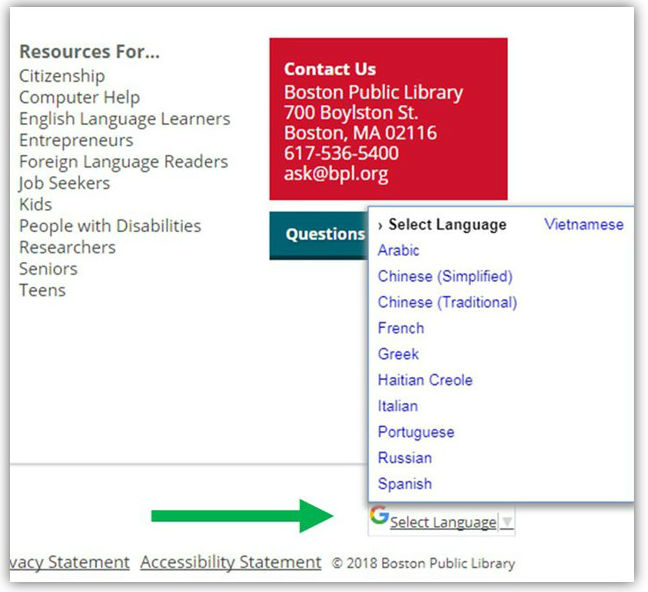
    This website can be translated by accessing our translate button available in the bottom right corner of every page. We can translate into the following languages: Arabic, Chinese (simplified), Chinese (traditional), French, Greek, Haitian Creole, Italian, Portuguese, Russian, Spanish, and Vietnamese.

    translate

    A library card in good standing means there are no blocks on the card. A block could be in place for a number of reasons including but not limited to: an expired card, multiple overdue items, replacement cost fine(s) greater than $24.99, a trespass letter on file, more than one existing account, eCard ineligibility, or unreturned ComCat/ILL items.

    If you've discovered you've misplaced something at a recent visit to the Central Library, please call 617.859.2222 to speak to our security staff. We do collect a number of forgotten items in the library in our lost-and-found and the security guards may be able to assist you.

  • Digital Commonwealth Program

    The only items you need to prepare prior to your arrival are samples of the materials you are proposing be digitized (including samples of any descriptive information you have for the materials — catalog cards, MARC records, spreadsheets, finding aids, etc.). During the visit, we will assess materials for both fragility and appropriateness, so having samples available is very helpful. We want to see anything you have in mind, even if you suspect digitization is a long shot.

    Please also prepare a list of questions for us. We’re there to help you feel comfortable with the process, so no question should be considered unreasonable or silly.

    Lastly, if you have anything that you think we might bring back to the BPL with us, after assessment, you need to have boxes and packing material ready so that we can transport it safely.

    For information about what types of content may be contributed, see the Collection Development Policy.

    No. Participating institutions are responsible for obtaining their own packing supplies, including sturdy boxes and packing tape, for transport of materials. Depending on the type and fragility of items, you may also need some cushioning material (e.g., bubble wrap, packing peanuts, or crumpled kraft paper) to pad items and prevent shifting. Large sheets of sturdy cardboard may also be helpful if you need to package oversized material. Please ensure that you choose a box of suitable strength and size for the items you are transporting.

    If you are transporting bound materials, we ask that you use boxes that are close to the size of the boxes that typically hold reams of printer paper (nothing larger). If you are transporting a large number of small, archival boxes, placing a few of them inside a larger box can help protect them during travel. If you are transporting larger materials, such as maps or posters, sandwiching them between two large pieces of sturdy cardboard and taping them securely generally offers decent protection. If you have several short, flat boxes (for example, those that are 16” x 20” x 1”) and you cannot find larger boxes to hold them, they can be transported as is.

    In general, whatever size package you use, your materials should be held in sturdy containers that are travel-safe and human-liftable.

    No. Whether a shipping company or BPL staffers come to collect your materials, those materials should be packed and ready to go prior to the collecting agency’s arrival. Upon return, the materials will be left at the institution’s loading dock (if available), front desk, or another nearby location designated by the participating institution.

    Participating institutions should have carts or dollies available for transporting multiple boxes at once.

    That is really up to you. BPL staffers recognize that eliminating duplicate copies of this type of material (for example, postcards, photographs) can be very time-consuming, so we don’t require it. For our own collections, we often digitize multiple copies of the same items as they may have slight differences which could be important to those using the materials.

    No. Please remove any duplicate bound items from your set before you send your materials to the BPL. If BPL staffers finds duplicate bound items when preparing your materials for digitization, they will pick the cleanest copy, use that for digitization, and hold the other copies aside. If you are intentionally submitting multiple copies of the same bound items because they have minor differences, please include a note indicating that the duplicates were sent intentionally and that all copies should be digitized.

    It is difficult to give a specific answer to this question. The length of time the BPL will keep the materials depends on several factors, including the size of the collection, the uniformity of the materials, and the other collections in the lab at that time. On average, the entire process takes between one to two months, but in specific cases it has been significantly shorter or longer.

    That depends on the type of material that was digitized.

    Bound items digitized by the Internet Archive at the BPL are finished. All metadata for materials scanned by the Internet Archive must be complete prior to digitization. Following digitization, items are available through each institution’s dedicated collection page at archive.org, for example:

    East Bridgewater High School yearbook collection at the Internet Archive

    In addition, each digitized item is given a unique URL. These URLs are permanent and stable and are suitable for use as web links. For example, though not required, many institutions choose to add these URLs to their MARC records, or even to their institution’s own website. Here is how the East Bridgewater High School Library made the yearbooks available on their website:

    East Bridgewater High School yearbook collection at the Internet Archive at their school’s library web page

    The BPL will work with the Internet Archive and Digital Commonwealth to ensure that these items are available via Digital Commonwealth systems.

    Items digitized at the BPL Digital Imaging Lab may need additional work. The BPL lab only requires that a unique alpha/numeric identifier be assigned to each item prior to digitization. If your institution did not complete object descriptions suitable for use in the DC system prior to digitization, you will need to create these records. To learn more about creating structured data, see our list of Resources.

    No. Since the Internet Archive used its own programmers to develop its interface, the BPL doesn’t have deep technical knowledge of its index and search capabilities. For example, we don’t have information about how Internet Archive results might display in search engines such as Google or Bing. For this reason, technical questions are often better answered by staff at the Internet Archive.

    We can, however, help institutions better understand what descriptive information the Internet Archive needs prior to project commencement to facilitate their digitization process. And, once the fully functional Digital Commonwealth portal and repository is up and running, we will be able to answer technical questions about our own systems.

    No. Bound materials, which are digitized at the Internet Archive, can be downloaded directly from the Internet Archive website. For that reason, the BPL will not provide additional copies of the files on external media such as, CD, DVD, or external hard drive. However, the BPL will provide links to each volume on the Internet Archive’s site so that the download page can be easily accessed.

    No. The original grant was given to the BPL and the BPL has taken care of all necessary reporting. Funding for this project is now provided by the Commonwealth of Massachusetts and participating institutions are merely third-party beneficiaries; for them, there is no responsibility to report the benefit.

  • Metro Boston Library Network

    The Metro Boston Library Network is a network of public, school and academic libraries in the Metro Boston area. MBLN is one of the nine library consortia located in Massachusetts. MBLN hosts and supports the Network ILS (Integrated Library System) and provides technical support and staff training, facilitates the sharing of materials and assists in managing internet connectivity for members. MBLN is primarily funded through membership fees and receives significant support through the Massachusetts Board of Library Commissioners (MBLC). To learn more about this funding, visit the Grants to Networks page of the MBLC website: https://mblc.state.ma.us.

    Additional funding for telecommunications comes from the Federal Communications Commission (FCC) E-rate program.

    If you live, work, or go to school in Massachusetts, you are eligible for a library card at the BPL and at most of our MBLN Public Library members. Can’t make it to the library in person? Sign up for an eCard to use our electronic resources. If you want to borrow physical materials, you can upgrade to a physical card in person at any of our Public Library members.  

    Public library patrons may register, renew or replace a card at any MBLN public library.

    Come with a picture ID and proof of Massachusetts residency. A Massachusetts driver’s license or ID card typically satisfies both requirements but check with the individual member library for specifics.

    Policies may vary at each MBLN library, so ask your local library for information regarding requests, loan periods, renewals and fines. The owning library sets the policies for their materials. For pickup periods, loan periods, renewals and lost items, the policies of the lending library prevail. Because you may borrow materials from different libraries, you may see overdue fines on some materials and not others.

    Delivery for MBLN member libraries is made possible through the Massachusetts Library System.

    Materials borrowed from MBLN libraries, except museum passes, Library of Things items, some computer equipment, and non-renewable inter-library loans, may be returned to any MBLN Public Library member and Fisher College.

    Eligible materials renew automatically at the end of the loan period, up to two times. Items won't renew if another patron has a hold on them and no other copies are available, or if the item is restricted due to the lending library policy.

    You can also renew items yourself on your checked out page, but this will result in an earlier due date than the automatic process.

    If you have supplied your library with your email address or have signed up for text message notifications, you will receive a courtesy notification of which items have automatically renewed and which are due soon.

    All general circulating material is fine-free. Some specific exceptions (such as hotspots, equipment, and Library of Things items) may assess overdue fines, and these are determined by local library policy.

    Please contact the owning library for lost items. Lost item payments for Malden, Chelsea, and Fisher owned items may be made at those libraries; please contact the library directly for detailed information on how to resolve lost items.

  • Read Your Way To Fenway

    Not everyone wins the Read Your Way to Fenway contest, but we encourage you to apply again next year if you do not win this year.

    Read Your Way to Fenway is open to all children between the ages of 5 and 17.

    No. Tickets are for the Boston Red Sox game on Saturday, August 16 at 4:10 p.m. and we are not able to provide alternate dates.

    Each winner receives 3 tickets, one for the winner, one for an adult, and one for a friend, sibling or family member. The Red Sox do not sell extra tickets to the public for this particular game.

    If a child is not able to write their personal essay for any reason, they can tell their essay to an adult or a friend. The essay must be in your child’s own words.

    Yes, audiobooks count. Reading comes in many forms. Youth can listen to an audiobook, read out loud to a friend or family member (or be read aloud to), or read silently. Youth can read picture books, chapter books, graphic novels, magazines, or nonfiction — everything counts. Just be sure to tell us what you read and what you thought about it.

    The Read Your Way to Fenway contest is only open to children ages 5 to 17. As soon as your child turns 5, we encourage them to enter.

    Every winner receives 3 tickets — one for the winner, one for an adult, and one for a friend, sibling, or family member of any age. Please note that all winners must be accompanied by an adult, and that children aged 0-2 do not require a ticket.

  • Books Unbanned

    Anyone ages 13-26 living in the United States can get a BPL Books Unbanned card. If you live, work, own property, or attend school in Massachusetts, you should apply for a Boston Public Library physical card or eCard to get access to our collection and resources. Get started with a Boston Public Library card.

    You can check out up to 10 books at a time from available titles; you cannot place holds.

    You can borrow books for 14 days, and checkouts expire automatically.

    Your card will be valid for one year, with the possibility of renewal.

    This card only gives you access to our eBook and eAudiobook collection.

    Our collection has different titles than these libraries' collections, and some titles that are not available in their collection may be available in ours, or vice versa. You are welcome to apply for all the cards and access any collection to find the books you need.

    Get a Brooklyn Public Library Books Unbanned card.

    Get a Seattle Public Library Books Unbanned card.

    Get a Los Angeles County Library Books Unbanned card.

    No. If you live or work in Massachusetts, you should apply for a Boston Public Library card to get access to our collection and resources. Get started with a Boston Public Library card.

    No. This card is intended for teens and young adults ages 13 to 26 who do not have a Boston Public Library card. Get started with a Boston Public Library card.

    No. As part of our commitment to intellectual freedom, we protect your privacy and keep information about you and your use of the Library confidential. Confidentiality extends to all records with identifying information about you, including your requests for materials and borrowing history. We will not disclose individual patron information except as necessary for the proper operation of the Library, upon your consent or as required by law. We do aggregate and analyze collective patron data to understand and help us fulfill community interest. Read our Patron Privacy Policy.

    Boston Public Library's Books Unbanned card will be funded by private support through The Boston Public Library Fund. If you are interested in supporting Books Unbanned, please consider contributing through the BPL Fund.